

In today’s ever-evolving landscape of smart homes where connectivity has become the backbone of our lifestyle, a robust Wi-Fi router for seamless internet connectivity has turned out to be one of the primary requirements. Google released Google Nest Wi-Fi in 2019 aimed at helping connect homes and small businesses with uninterrupted networks through their improved version of mesh networking solution Google Wi-Fi released in 2016.
Google Nest Wi-Fi
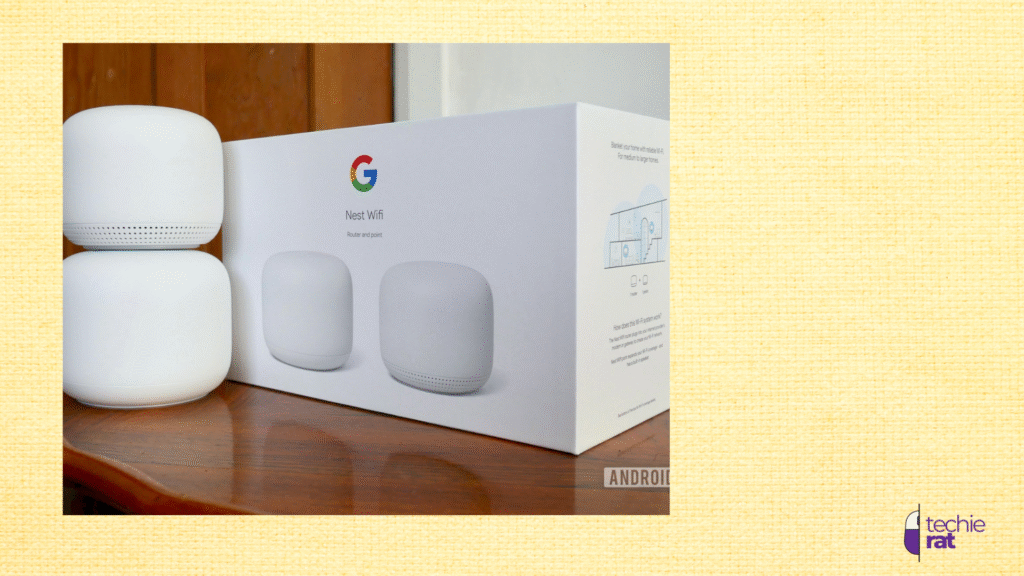
It is a Wi-Fi system based on mesh networking technology to provide strong internet connectivity in homes and reduce the signal dead zones. The Wi-Fi system consists of two major parts – a router and Wi-Fi points. The router connects to the modem and works as the primary source of signals whereas the Wi-Fi points help in covering the extra area to ensure the internet reaches at every point.
The Google Nest Wi-Fi you receive has two major components – router and nest points (they can be one or two depending on your choice).
The Router
The Wi-Fi router displays an aesthetically pleasing design having rounded edges and is available only in white color. With 4.3 inches (109mm) height and 3.5 inches(89mm) diameter and weighing 454 grams it fits in easily in home environments.
The rear side carries a power jack for connecting to Power Point and two ethernet ports (1LAN and 1 WAN), one for connecting to the modem and the other for connecting to any of your devices like a desktop or laptop, etc. Each router is capable of supporting up to 1Gbps speed.
The power adapter specifications are A05(10V/2.25A)
The router works on a 1.4 GHz quad-core CPU, equipped with 1 GB RAM and 4GB flash memory. It has the capacity of reaching rates of 1733Mbps on 5GHz and up to 400Mbps of data rates on 2.4GHz bandwidth. It is designed on 64-bit architecture.
Our experience suggests that the devices get a better speed when directly connected to the router than to the Nest points. This can be due to the Wi-Fi point’s weaker antennas.
Wi-Fi- Points
Available in three colors – Mist, Snow, and Sand, they are stylishly designed cylindrical shaped 4 inches (102mm) tall and 3.4 inches (86mm) in diameter.
The prime use of the nest points is to expand your network coverage area to every corner of your premises.
Wi-Fi points capacity concerning data rates is 866Mbps with 5GHz bandwidth and 400Mbps with 2.4GHz. It is wireless and also does not contain ethernet jacks, so it can be easily placed at locations of your convenience by your home design.
Apart from being an internet coverage area extender, the point has several other functionalities as well, like a Mini speaker which gives 360-degree audio output. The Wi-Fi Point can be carried outside for stronger signals and to use its built-in speaker system. The speaker system can be operated through simple touches for volume control, playback control, etc.
You can place it inside or outside area in a garden and use it as a Nest Mini smart speaker since it contains the required hardware and also has a Bluetooth radio. You can connect it to smart devices such as lights or ask it the sports, weather updates, play music at your convenience.
When Google Assistant is asked something or is answering it, an LED light glows white at the bottom. There also is a small switch to disable the Google Assistant and the orange LED starts glowing. It supports all of the Google Assistant commands and the Nest Mini commands and additionally, a few more voice commands for tasks like running an internet speed test or pausing the internet.
How many Nest Points Should I Buy?
The answer to this question depends solely on your requirements and your house’ dimensions. Our experience at testing says that if you use just the router and no nest point you should expect a coverage area of 2,200 square feet and an additional 1600 square feet with one Wi-Fi point. We used one nest point at our home and satisfactorily received 3,800 square feet of area under the internet coverage.
There was no dead zone in my case, but if it exists in your particular case due to some thick wall or other obstructions, you can always work it around with the use of a Wi-Fi Point. I could easily stream 4k videos where the signals were present. Also, there was no issue with many devices being connected to the internet at the same time.
Since Wi-Fi Point also works as a Mini speaker and you find it of no use to you, then you can go for a pack of two routers but no points. This configuration gives us a better area coverage (4,400 square feet) than the combination of one router and one point. Also, this way you can have two ethernet jacks at your disposal.
Setting Up the Device and Google Home App
You would be requiring the Google Home App to use and manage Google Nest Wi-Fi. Follow these simple steps to get things done properly.
1. Go to the Google Play Store for Android and to the App Store for iOS-based devices and download the Google Home App.
2. Plug in your Google Nest device to the internet modem through an Ethernet port and also make sure the power supply is being provided to the device.
3. Next thing you should do is play the App on your device.
4.Search for the plus sign “+” on top left corner of your screen.
5. Click on the Devices and after that add Google Nest.
6. The App will navigate you through the various setup steps asking you some needed information which you should feed and proceed towards connecting your Google account to Google Nest Wi-Fi.
7. You will be asked to scan the QR code which is located at the bottom of your Wi-Fi device which you should do with your phone’s camera.
8. After this step you should connect your device to the internet provided by the Google Nest device.
9. The next step consists of assigning a name for your network and creating a password for it.
10. If you have extra Wi-Fi Points that need to be added to the account you can add them.
One Tip from our side: While you set up Google Nest Wi-Fi and connect it with the Google Home App, that time use a stable internet and don’t use the internet provided by Google Wi-Fi.
The Google Home App will guide you through placing the Point for optimal efficiency, in case you are using it.
Uses of Google Home App
1. The Google Home App can be used for checking and managing the various devices that are connected to your internet network.
2. It can be used for performing a speed test to know the internet speed you are receiving.
3. You can connect the guest networks with different passwords.
4. You can control the Google Wi-Fi network with voice commands through Google Assistant.
5. Google Home App can be used for controlling the smart devices of your home connected to the Google Nest Wi-Fi network. Devices like Cameras, lights, etc.
6. You can block the adult or other abusive content on all the devices connected to the network.
7. You can monitor the internet and get periodic reports about which kind of content is being consumed on which connected device.
8. You can receive network issues alerts or your device update requirement alerts on the Google Home App.
9. You can control and manage your Google Wi-Fi network by being connected to the internet from anywhere.
My experience on the speed received and consistency of the Internet
I did several tests to check and verify the internet quality claims by Google Nest Wi-Fi. For the sole purpose of testing, I decided on placing the Google Nest router on first floor and the Nest Point I placed on the second floor. Moving through the rooms on the first floor what I noticed was the internet is stable and consistent even when was at the farthest distance in the 3,200 square feet building. The speed tests displayed the speed to be between 300Mbps to 350Mbps on the entire ground floor.
As I checked on the second floor the speed was around 150Mbps in the same room where the Wi-Fi point was placed. Walking away from the point to the farthest rooms gave a speed of 100Mbps.
Since speed and stability are the two most important parameters of any network, I would say Google Nest Wi-fi performed pretty well on both fronts.
Limitations of Google Wi-Fi Nest
Here is a list of aspects of Google Nest Wi-Fi that we find can be improved upon.
1. Lacks Wi-Fi 6: It works on Wi-Fi 5 (802.11ac) technology, which is far from being the latest and most advanced. Wi-Fi 6 would have been a better choice looking at the future with internet speeds and the number of devices connected to the internet in demand. The more advanced Wi-Fi 6 offers much-improved speed and stability and the number of devices that it can cater to.
2. Speed Handling limitations: It works well and satisfactorily if you work with speeds up to 350Mbps. But after that, it is unable to utilize the full potential of the internet speed provided, especially if you are away from the router and near a point in another room.
3. Speed reduces as you get internet from a point: The speed is best if you are directly connected to the router. If you walk away from the router to another floor where the point is placed and start getting internet from the point, chances are your internet speed is reduced by half.
4. Points lack ethernet ports: Since the points are wireless you cannot connect it to your device through an ethernet port if you wish to. The points having the ethernet ports can be an additional advantage for the users.
5. Over-dependency on Google Services: Many features in the Google App for Google Nest Wi-Fi use Google’s Cloud services. It might raise privacy and data collection concerns.
6. Cost factor: Even though Google’s Nest Wi-Fi is competitively priced, the total cost of the router and two nests may be higher than several Wi-Fi tools available in the market.
To Wrap Things Up
Google Nest Wi-Fi delivers a user-friendly solution to those looking for network coverage and reliability, with its easy steps to set up the Wi-Fi system. Its seamless integration with Google Assistance and easy management with Google Home App makes it especially suitable with users of varying technical knowledge. However, with Wi-Fi 5 being used in the system, the high-demanding users may have to remain unsatisfied. Despite all these factors, the Google Nest Wi-Fi is a solid choice for people.
Frequently Asked Questions
Is Google Nest Wi-Fi secure?
Answer: Yes, it is secure. Since it includes built-in features such as WPA3 encryption and automatic firmware updates. It also allows you to manage your Wi-Fi system through the Google Home App.
How many devices can Google Nest Wi-Fi support at the same time?
Answer: It is capable of supporting many devices simultaneously connected to it. If you want to know the exact number that might depend on the data being consumed by each device.
Can Google Nest Wi-Fi be used in a business environment?
Answer: Google Nest Wi-Fi was primarily designed for domestic usage, but it can be used provided the business is small. For large businesses, a more robust Wi-Fi system can be required.
Can I remain in control of my Google Nest Wi-Fi when I am not at home?
Answer: Yes, you can control and manage your Google Nest Wi-Fi through the Google Home App, provided you are connected to the internet then.
What kind of guarantee does the Google Nest WIFI come with?
Answer: Google Nest Wi-Fi is delivered with one year of limited warranty. Moreover, the terms mentioned in the warranty be region dependent. It is best to check with your retailer for more specific information.

Leave a Comment